mirror of
https://github.com/deadnews/mc-onedark.git
synced 2026-02-26 09:18:36 +03:00

31 lines
1.2 KiB
Markdown
31 lines
1.2 KiB
Markdown
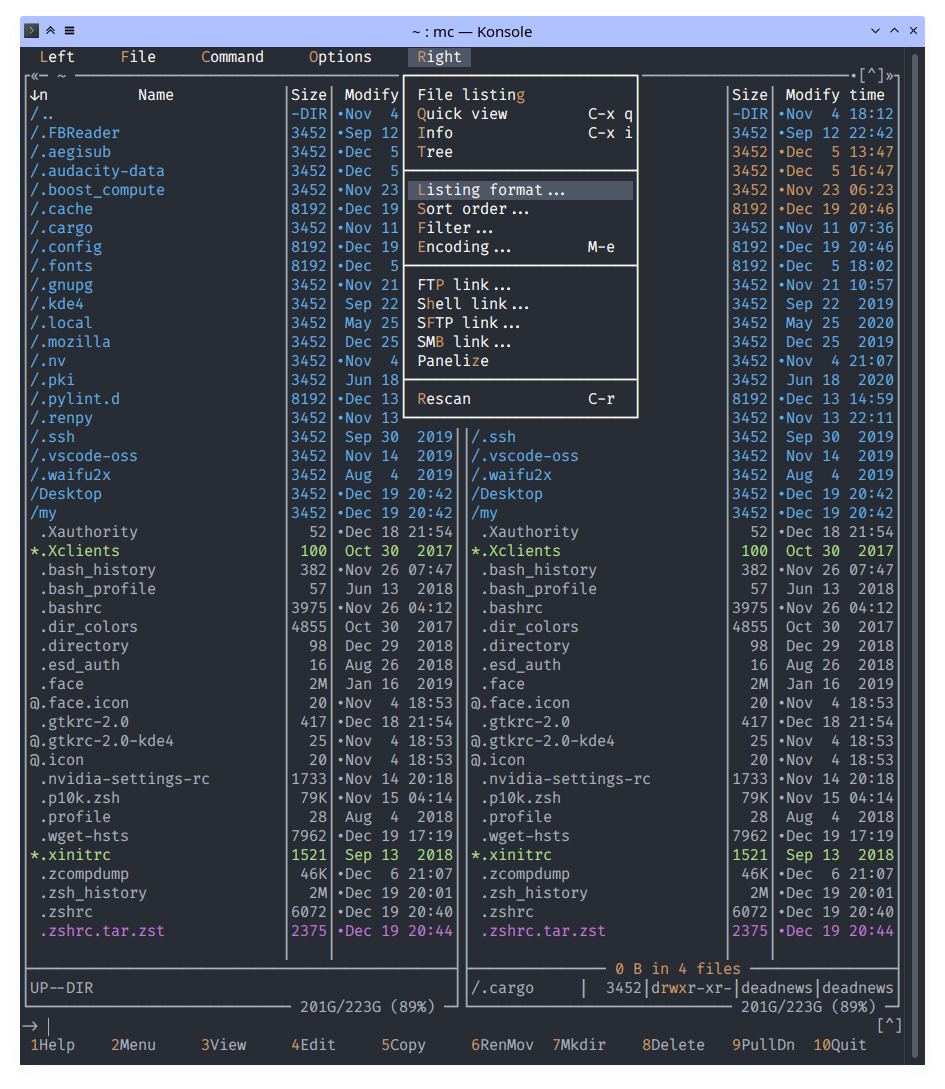
# One Dark theme for [Midnight Commander](https://github.com/MidnightCommander/mc)
|
|
|
|
|
|
|
|
# Theme variants
|
|
|
|
The mc OneDark theme comes in two flavors, an 8/16 color option (`onedark.ini`) and a 16M color option (`onedark16M.ini`). The 8/16 color version is entirely dependent on having installed the relevant OneDark theme for your terminal too as it uses the color palette fixed by your terminal.
|
|
|
|
See [Konsole](https://store.kde.org/p/1225908/) color scheme for example.
|
|
|
|
The 16M color version can be used independently of any terminal color scheme, but requires true color support in the terminal.
|
|
|
|
# Installation
|
|
|
|
Copy files from `./skins` to `~/.local/share/mc/skins` \
|
|
Copy files from `./config` to `~/.config/mc/` (optional)
|
|
|
|
|
|
# Activating theme
|
|
|
|
Option 1: edit `~/.config/mc/ini` and add `skin=onedark`: \
|
|
`sed -i 's|\(^skin=\).*$|\1onedark|' ~/.config/mc/ini`
|
|
|
|
Option 2: choose the skin through the mc UI with: \
|
|
`F9 > Options > Appearance`
|
|
|
|
Option 3: run mc with specific skin: \
|
|
`mc -S onedark`
|
|
|
|
Option 4: add `export MC_SKIN=onedark` to the initialization file of your shell (e.g., `~/.bashrc` or `~/.zshrc`): \
|
|
`echo "export MC_SKIN=onedark" >> ~/.zshrc` |